Trucker Path: Truck GPS & Fuel
- 4.7
- Rating
- 5.00M
- Installs
- Free
- Price

 Analysis by App-foxy
For a long-haul driver, the most useful navigation app is not always the one that gives the fastest route. A route that saves a few minutes but sends a tractor-trailer toward a restricted road, an unsuitable bridge, or a full truck stop is not really a better route. That is the problem I found Trucker Path: Truck GPS & Fuel trying to solve: it treats the journey as a truck operation rather than a simple trip from one address to another.
Developed by Trucker Path, this free Maps & Navigation app combines truck-focused routing with practical places a driver needs along the way, including parking, diesel, and weight stations. I tested it with the mindset of someone planning a working route, not a weekend drive, and its strongest value became clear quickly: it helps turn route planning into a sequence of decisions about where a commercial vehicle can travel, stop, refuel, and remain compliant.
The app is available to Everyone, runs on Android from version 8.0 onward, and has built a substantial audience with over a million installs. Its average rating is 4.8 from around 72 thousand ratings, which suggests that the truck-driving audience generally finds the concept useful. Those figures do not remove the need for judgment, but they do fit my impression: this is a specialized tool with a much clearer purpose than an ordinary road map.
You May Also Like

 Blood Strike: 2.5 Anniversary
Blood Strike’s Loadouts Turn Every Drop Into a Tactical Gamble
A close look at Blood Strike’s custom loadouts: how fast access to signature weapons reshapes its battle royale rhythm, rewards preparation, and narrows the gap between fights.

 Pandora - Music & Podcasts
Pandora’s Music Is Easy to Start, but Harder to Recover
Pandora’s strength is its low-effort path from a seed to a station. Its weak spot is how much confidence it asks you to place in connection, setup, and quiet recovery.

 8 Ball Pool
 Is Built on Rivalries, Rematches, and Routine
A close look at the rivalries, rematches, shared routines, and unanswered safety questions that turn a quick pool match into a persistent mobile community.

 Samsung Music
’s Quiet Strength Is Playing What You Already Own
Its reach comes less from spectacle than from dependable access to a personal library. That simplicity is both the app’s strongest retention engine and its ceiling.

 AccuWeather: Weather Radar
AccuWeather Review: A Quick, Clear Forecast for Everyday Decisions
For everyday plans, the best forecast is the one you can understand quickly. AccuWeather makes rain timing, radar, and local conditions easy to act on, with a few trade-offs.

 Hill Climb Racing
Why Hill Climb Racing Still Turns Crashes Into One More Run
A tiny car, a bumpy hill and one more upgrade: Hill Climb Racing keeps resurfacing because its simple chaos makes every near-miss feel personal.
More From Our News Desk



Why truck-safe routing changes the whole trip
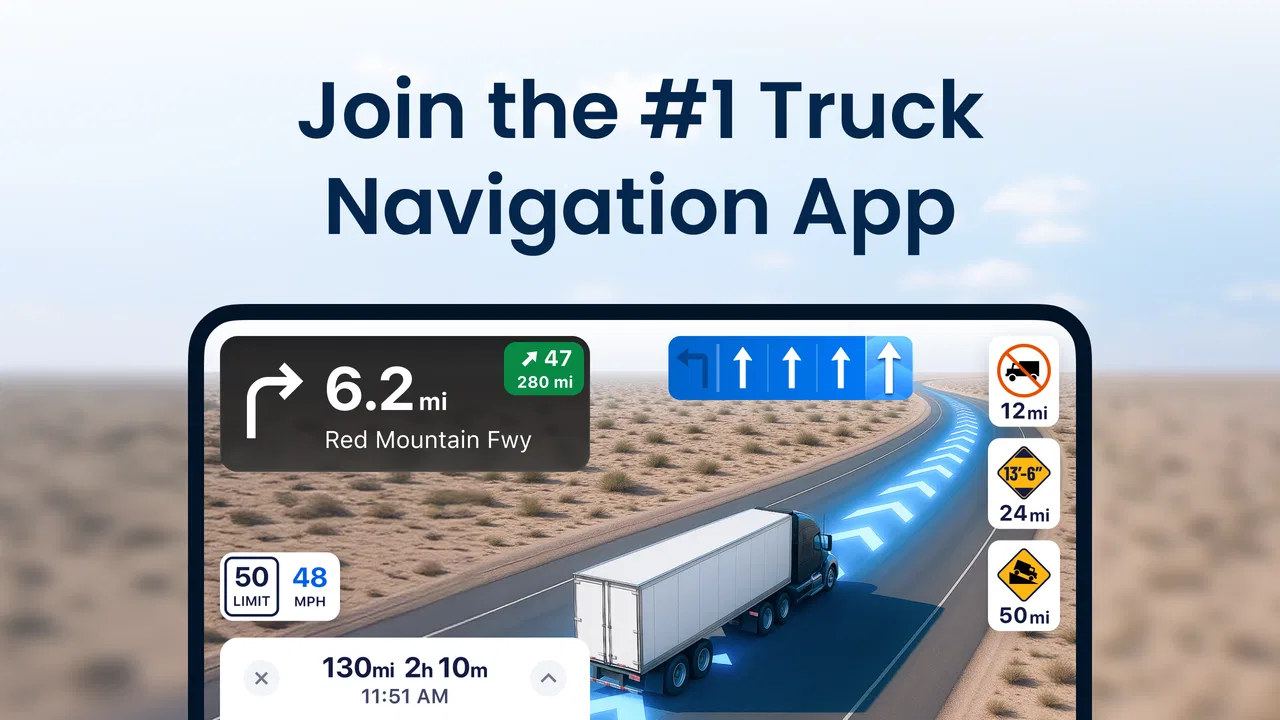
The central capability is truck-oriented GPS navigation. That sounds like a small distinction until you compare it with using a normal car-navigation app from the cab. A standard map may know the legal road network, but it usually presents the journey around distance, traffic, and arrival time. A professional driver has a different set of constraints. Vehicle size, weight, fuel range, delivery timing, rest planning, and parking availability all affect whether a route is genuinely workable.
In my view, the most important benefit is not simply finding an address. It is reducing the number of bad surprises between the starting point and the destination. A driver can look for a fuel stop before the tank becomes urgent, check for a suitable place to park, and keep weight stations in mind while preparing the route. That creates a more realistic picture of the day than a single blue line with an estimated arrival time.
I also like that the app brings these supporting decisions close to navigation instead of making the driver jump between a route planner, a fuel-finder, and a separate parking search. That does not mean every result should be trusted without checking. It means the planning process starts in the right place. For a commercial driver, that difference is meaningful because a missed stop or unsuitable detour can affect the entire schedule.
The app’s store summary highlights parking, fuel, diesel, and weight stations, and those are not decorative extras in this context. They are the points that shape a truck route in practice. A car driver may choose a service station casually. A truck driver may need a diesel pump that is accessible to a larger vehicle, a legal parking area, and enough remaining driving time to reach it safely. The app’s focus makes those needs visible earlier in the planning process.
Planning around the vehicle instead of the map
When I use a regular navigation app, I tend to enter a destination and accept the suggested route unless something looks obviously wrong. With Trucker Path, I approach the trip differently. I first think about the vehicle and the day: how far I can reasonably go, where fuel will be needed, whether a stop is worth reaching before the evening rush, and which parts of the journey deserve a backup plan.
That change in mindset is one of the app’s less obvious strengths. It encourages the driver to plan the route as a working schedule. A route can be technically valid and still be poor for a truck if it ends at a location with no practical parking or forces a late search for diesel. By placing truck-relevant locations beside navigation, the app helps expose those problems before departure rather than after they become urgent.
I would not describe it as a replacement for professional judgment. Road restrictions can change, local access can be complicated, and a destination may have a final approach that requires instructions from the receiver. I still treat the app as a planning assistant and a navigation aid, not as permission to ignore posted signs or company procedures. That distinction is especially important when the route includes unfamiliar towns or industrial areas.
What using it feels like during a real working day
Imagine leaving a distribution center with several hours of driving ahead. Instead of waiting until the fuel gauge is low, I would use the app to identify a diesel stop that fits the route and then look at parking options farther along. The practical advantage is not just knowing that a stop exists. It is being able to think about the order of the stops and how they fit the route, rather than making separate searches while already tired.
Later, if traffic or a loading delay changes the schedule, the same information becomes useful again. I can reassess whether the planned parking area is still realistic or whether I need to look farther ahead. This is where the app feels more relevant than a basic car map: the journey is treated as something that depends on operational stops, not only on road distance.
For a new driver, this workflow can also make route preparation less intimidating. The app gathers the categories that matter most to truckers in one place, so the driver does not have to remember every possible search before starting. For an experienced driver, the benefit is more about speed and convenience. It can serve as a second planning view alongside established habits, especially when entering an unfamiliar region.
One tip I found valuable is to search for the next practical stop before the current one becomes a problem. If parking is important for the end of the shift, I would check it early and keep an alternative in mind. That approach avoids treating the first available result as a guarantee. It also makes the app more useful: the driver is using it to manage uncertainty, not merely reacting to it.
The best scenario: a long route with uncertain stopping points
The strongest use case is a long interstate or regional haul where the driver needs to coordinate navigation, diesel, and parking across unfamiliar territory. In that situation, the app’s truck-centered approach can save mental effort. I can begin with the route, identify fuel opportunities that make sense for a heavy vehicle, and consider where a break or overnight stop might fit without leaving everything until the final hour.
This is particularly helpful when the destination is not the difficult part. Reaching a large facility may be straightforward, while finding a sensible place to stop before or after the delivery is much harder. A normal navigation app may get me to the gate, but it does not naturally encourage me to plan the surrounding truck logistics. Trucker Path is more useful in that wider context.
It can also help when a driver is covering a route outside the locations they know well. Familiar drivers often carry a mental list of dependable stops, but that knowledge does not travel everywhere. The app gives a starting point for discovering relevant locations and building a route around them. I would still verify the final approach and current conditions, but the initial planning is faster than beginning with a blank map.
Another realistic scenario is a route where fuel planning matters more than the shortest arrival time. A car driver may be happy to detour for a cheaper pump or wait until the next town. A truck driver may prefer a slightly less direct route that offers a practical diesel stop and a better chance of parking later. The app supports that kind of decision because it keeps those places connected to the journey rather than treating them as unrelated searches.
Where it compares well with ordinary navigation apps
Google Maps, Apple Maps, and similar services remain excellent choices for general driving, local addresses, traffic awareness, and walking around a destination. If I am driving a passenger car to a restaurant or visiting a residential address, I would not install a specialist truck app just for that. Mainstream navigation is often simpler for everyday personal travel.
The comparison changes when the vehicle itself determines which roads and stops are practical. Ordinary apps are designed for a broad audience, so their idea of a useful nearby location may not match a trucker’s needs. Trucker Path earns its place by putting truck-related destinations and route concerns closer to the center of the experience.
That specialization comes with a learning curve. A general map feels familiar immediately because most people already know how to search for an address and start navigation. This app asks the user to think in terms of truck stops, diesel, parking, and weight stations. I consider that a worthwhile adjustment for professional driving, but it may feel like unnecessary complexity to someone who only wants a quick route.
The tradeoffs I noticed before relying on it
The first tradeoff is that convenience can encourage overconfidence. Seeing a parking location on a map does not guarantee that spaces will be available when I arrive, that the entrance will suit my exact vehicle, or that local conditions have not changed. I would use the app to plan a primary stop and a backup, especially near the end of a shift. The more important the stop, the less sensible it is to depend on one map result.
The second tradeoff is that truck navigation still needs common sense at the final approach. Industrial parks, delivery yards, and local streets can have restrictions or awkward entrances that are difficult to understand from a route line alone. I would compare the suggested path with signs, dispatch instructions, and the receiver’s directions. The app can reduce planning friction, but it cannot inspect every gate or temporary road condition for me.
The third issue is the financial model. The app itself is free, but it includes in-app purchases ranging from $1.99 to $299.99 per item. That wide range means I would check exactly what a purchase unlocks before paying and decide whether the free experience already covers my needs. Occasional drivers may find the free starting point sufficient, while full-time users may be more willing to consider paid options if they fit a regular workflow.
I also would not choose it as my only navigation source for every trip. A second map can be useful for checking a street layout, confirming a business entrance, or comparing general traffic information. Running multiple tools can add distraction, though, so I would do most planning while parked and keep the active driving screen as simple as possible. The best setup is not the one with the most apps open; it is the one that leaves the driver with the clearest next decision.
Small workflow choices that make it more useful
My first practical recommendation is to plan in layers. Start with the destination and broad route, then add the fuel decision, then examine parking near the likely stopping point. Doing all three at once can make the screen feel busy, while doing them in this order mirrors the way a trip actually unfolds. It also makes it easier to notice whether a stop requires a meaningful detour.
Second, I would check weight-station locations before departure when the route crosses areas where compliance planning matters. The point is not to treat every station as an obstacle. It is to avoid being surprised by the sequence of the route and to leave enough time for the normal interruptions of commercial driving. This is a small preparation step, but it can make the day feel more controlled.
Third, I would use the app before the shift to create a mental fallback plan instead of searching only when tired. Knowing where the next two realistic fuel or parking opportunities are can be more valuable than finding one supposedly perfect stop. This is a genuine strength of the app’s structure: it encourages thinking ahead about the journey’s weak points.
Finally, I would keep the app updated and make sure the phone meets its Android requirement before depending on it for work. The current version is 6.8.9, and the minimum operating system is Android 8.0. Those details matter less than route quality during a normal day, but compatibility problems are the last thing a driver needs before leaving a yard.
Who benefits most, and who should skip it
I think the biggest gains go to over-the-road drivers, regional haulers, owner-operators, and anyone who regularly drives a large vehicle through unfamiliar areas. These users are the ones most likely to benefit from combining truck navigation with diesel, parking, and weight-station planning. The app is also useful for newer commercial drivers who want a more structured way to prepare a route instead of relying entirely on memory or scattered searches.
It is less compelling for a passenger-car driver, a cyclist, a pedestrian, or someone who only needs local turn-by-turn directions. Those users may find the truck-focused categories distracting, and a mainstream map will probably feel quicker. I would also hesitate to recommend making it the sole authority for a highly regulated or unusual load without checking official restrictions and dispatch guidance separately.
The age rating of Everyone makes the app broadly accessible from a content perspective, but its real audience is defined by the work it supports. A casual user can open it, yet the value becomes much clearer when parking availability, diesel access, and route suitability affect income, delivery timing, or the ability to finish a shift safely.
My final take after using it as a trucker’s planning tool
Trucker Path: Truck GPS & Fuel is most convincing when I use it not as a prettier map, but as a way to plan the practical parts of a truck journey. Its truck-safe navigation focus changes the question from “How do I get there?” to “How do I get there with the right road, enough fuel, and a realistic place to stop?” That is a much better question for professional driving.
I appreciate the free entry point, the clear trucker-focused purpose, and the way parking, diesel, and weight stations fit into the route-planning process. I also appreciate that it does not eliminate the need for judgment. Results should be checked, local signs still matter, and a backup stop is wise whenever timing is tight.
My recommendation is straightforward: if you drive a truck often, especially beyond familiar routes, this app deserves a place in your planning routine. Use it before departure, make decisions while parked, and treat its locations as useful guidance rather than absolute guarantees. If you only need ordinary car navigation, it is probably more specialist than necessary. For the drivers it is designed around, however, its focus can make a demanding day easier to organize and less vulnerable to avoidable surprises.
FAQs for Trucker Path: Truck GPS & Fuel
01What features does Trucker Path offer for truck drivers?
Trucker Path provides a comprehensive suite of tools for truck drivers, including a GPS tailored for trucks, real-time updates on weigh stations, rest areas, and truck stops. It also offers fuel pricing comparisons, parking availability, and routing that considers truck-specific restrictions. These features help streamline the journey and ensure efficiency on the road.
02Is Trucker Path available for both Android and iOS devices?
Yes, Trucker Path is available for both Android and iOS platforms. Users can download the app from the Google Play Store for Android devices and from the Apple App Store for iOS devices. The app is optimized for both platforms to ensure a smooth user experience, regardless of device type.
03How accurate is the truck-specific GPS in Trucker Path?
The GPS feature in Trucker Path is designed specifically for truckers, incorporating truck-specific restrictions such as weight limits, bridge heights, and hazardous material regulations. Users generally find it accurate and reliable, but it’s advised to cross-reference with other navigation tools and stay alert to road signs for the safest travel.
04Does Trucker Path offer any features for finding truck parking?
Yes, Trucker Path includes a feature for finding truck parking. It provides real-time parking availability at truck stops, rest areas, and even Walmart locations. This feature helps drivers plan stops more effectively and avoid the stress of searching for parking, especially during peak hours or late at night.
05Are there any subscription fees associated with Trucker Path?
Trucker Path offers both free and premium subscriptions. While the free version provides access to many essential features, the premium version unlocks additional functionalities like enhanced GPS features and ad-free usage. Users can choose the plan that best suits their needs based on their frequency of travel and specific requirements.
Pros
- User-friendly interface enhances navigation.
- Accurate truck-specific GPS routing.
- Real-time updates on fuel prices.
- Comprehensive truck stop information.
- Community-driven insights and reviews.
Cons
- Occasional map loading delays.
- High battery consumption.
- Some features require premium access.
- Limited offline functionality.
- Inconsistent customer support response.

Trucker Path: Truck GPS & Fuel
Gallery